
Get students in
SmartLearn JAMB UTME and Post-UTME practice students actually keep opening.
Built for UTME and Post-UTME candidates, and the schools, centres and tutors that prepare them. This page answers the questions in the order you will probably ask them: what it does, what it runs on, what it costs, what you install, and what happens when something goes wrong.
₦2,000 once, per device, for the lifetime of that device — the licence terms are under "What a licence covers", below.

- 01 More than 25,000 questions, every one with a worked explanation
- 02 Practise in the same interface, and under the same clock, as the real thing
- 03 Windows, Android, iOS and mobile web — the 2026 edition
- 04 The complete JAMB brochure and syllabus, searchable, inside the app
- 05 Everything works offline once installed
Who it is for: UTME and Post-UTME candidates, and the schools, centres and tutors that prepare them.
- Windows
- Android
- iOS
- Mobile web
What it does
The real CBT hall, rehearsed on the student's own machine.
SmartLearn puts more than 25,000 past questions, worked answers and mock sittings on a student's own computer or phone. It behaves like the real CBT hall, it keeps working on the days the data runs out, and the 2026 edition runs on Windows, Android, iOS and mobile web from the same question bank.
-
Real past questions
Every subject JAMB offers, year by year, with the worked explanation underneath each answer so a wrong choice teaches something. Post-UTME papers from a range of schools, across several years, sit alongside them.
-
Mock the whole exam
Sit four subjects against the clock exactly as the board sets them, then read the breakdown by subject and by topic. Choose how the paper is laid out — one question a page or several, flowing down or across, on screen or as it would print.
-
Progress you can see
Graphical charts, performance over time, an analysis of where the time actually went, and an export to PDF when a parent or a tutor wants the evidence.
-
The brochure and syllabus, searchable
The complete JAMB brochure and syllabus ship inside the app with full search, so checking a course requirement or a topic does not mean going online and getting distracted.
-
On the phone too
The Android and iOS builds carry the same bank and, since 2026, the exam and study modes that used to be desktop-only. Revision continues on the bus.
-
Novels, summaries and dictionaries
Set literature texts arrive summarised — The Life Changer among them — with the character and theme notes examiners keep asking about, and possible questions. Subject dictionaries from several areas sit in one place beside them.
-
Ask Kace
Kace is the built-in SmartBot, and it knows courses and schools: what a course needs, where it is offered, what a word means. It answers in plain language without leaving the app.
-
Learning that does not feel like it
SmartMario Survival turns the same question bank into a game, on desktop and — since the 2026 edition — on the phone. Repetition is how this exam is won, and repetition is boring.
-
Built to be familiar
The desktop interface was deliberately modelled on the application every Nigerian student has already used — Microsoft Word — so that almost nobody needs a manual to start. Themes change the look when the mood does.
The reasoning
How it holds up when you look closer.
The claims above, with the mechanism behind each one — the part a brochure leaves out and an ICT officer asks about first.
The network exam: one laptop, a whole room
SmartLearn has carried a Bring Your Own Device network exam since the 2018 edition, and the 2026 edition gives it SmartExaminer's state management: if a device dies mid-paper, the candidate resumes on that device or another one. It is the same idea as SmartExaminer, sized for a room rather than a hall — and it needs no network infrastructure at all. An ad-hoc WiFi network from a single laptop is enough. Candidates join on their own phones with the free network exam app, or through the mobile web version on anything else.
- Friends and family practising the same paper together
- Computer centres and cyber cafés serving many customers from one exam
- Schools running a mock and then a general correction
- Tutorial and training centres running preparatory exams off one laptop
What a licence covers
A SmartLearn licence is per system or device and lasts for the lifetime of that device — there is no renewal. Profile management means several people can use one installation and each keeps their own scores, so a household or a small class is not buying one licence a head. The network exam is licensed separately for the desktop side; the mobile network exam apps are free.
- PC licence for the 2026 edition: ₦2,000, all JAMB subjects included
- Mobile activation code: ₦1,000
- Upgrade from the 2025 edition: ₦1,000
- Network exam PC licences run from 10 devices to unlimited
- Order online and the code reaches your phone and your email at once
The numbers
What it needs, what it weighs, what it covers.
So you can plan before you talk to us rather than after — the version, the size of the download and the machine it has to run on.
- Current edition
- SmartLearn JAMB 2026 (version 11.0.0)
- PC download
- 181 MB, Windows installer
- Previous edition
- SmartLearn JAMB 2025 (version 10.0.0), 168 MB
- Mobile
- Android and iOS, plus a mobile web version
- Question bank
- More than 25,000 questions, each with an explanation
- Coverage
- Every JAMB subject, plus Post-UTME papers from a range of schools
- Licence
- Per device, for the lifetime of that device; several users per installation
- Internet
- Needed once, to activate. Practice, mocks and explanations are all local.
What it looks like
On the phone in a candidate’s hand.
SmartLearn JAMB is the app a candidate revises on, so these are its own screens rather than a desktop view of them.
-
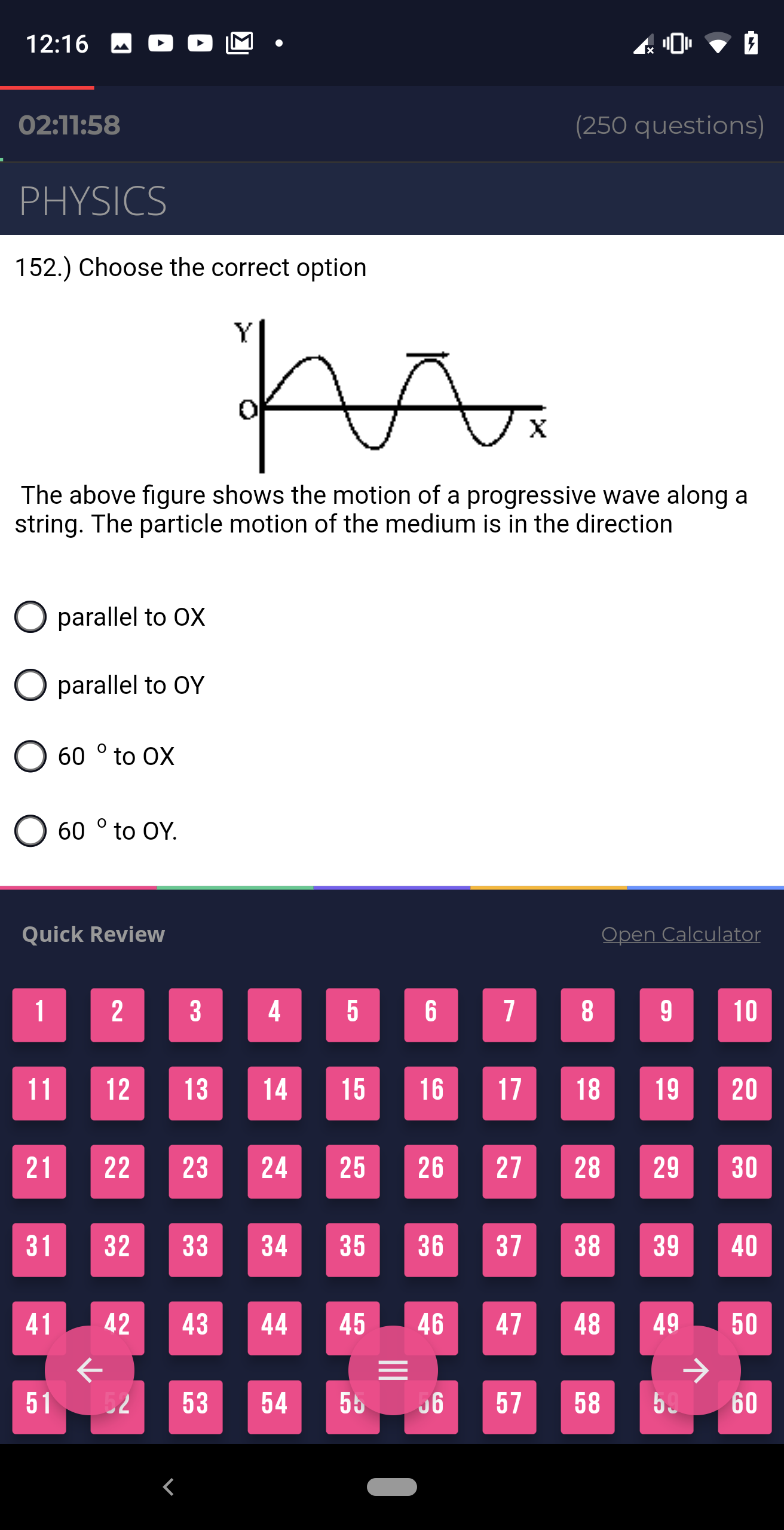
Sitting a paper A Physics question inside a 250-question paper, with the clock running, a calculator a tap away and a quick-review grid for jumping to anything left unanswered. -
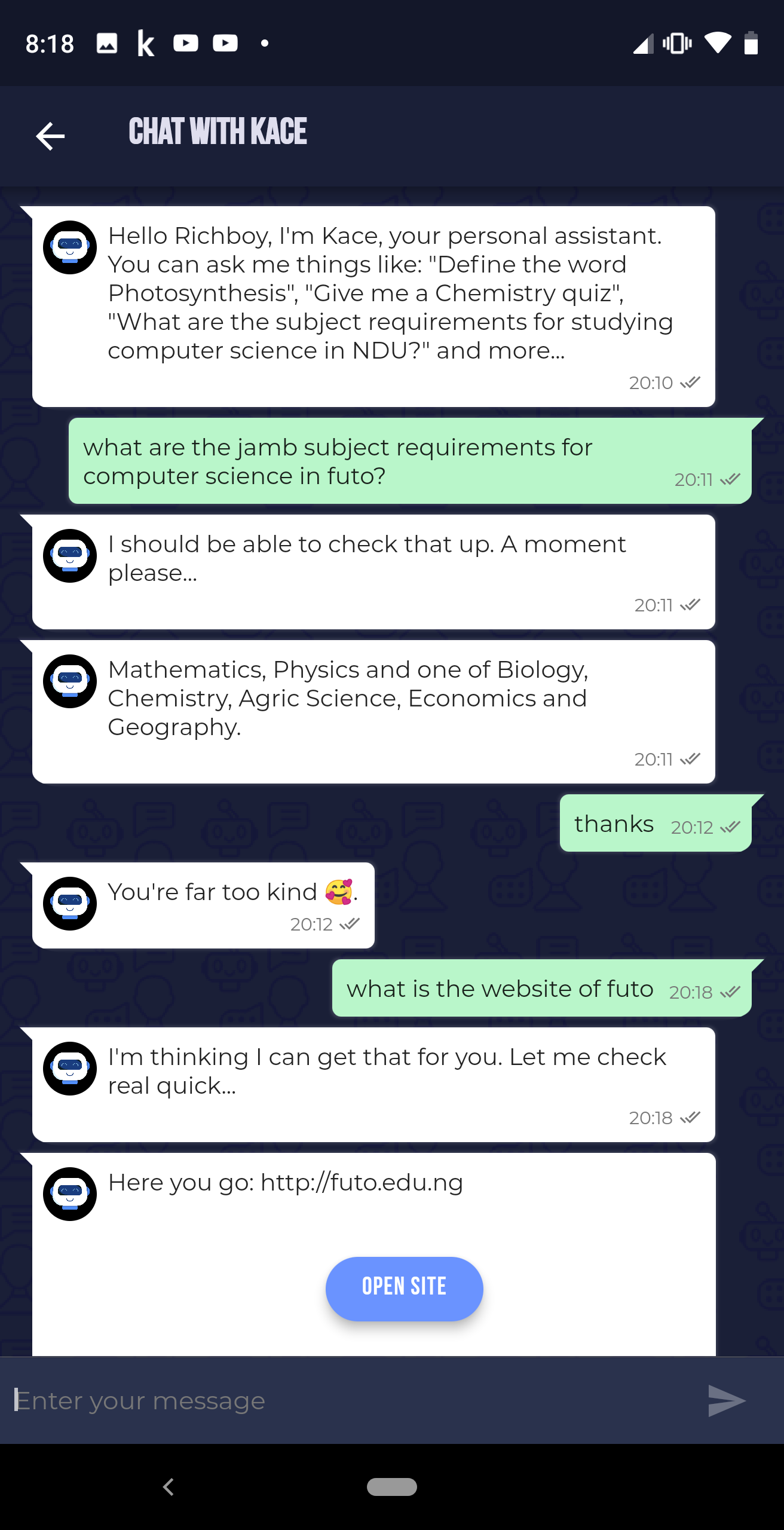
Asking Kace Kace is the built-in assistant. It defines a term, sets a quiz on a subject, or answers a question about what a course requires at a named university. -
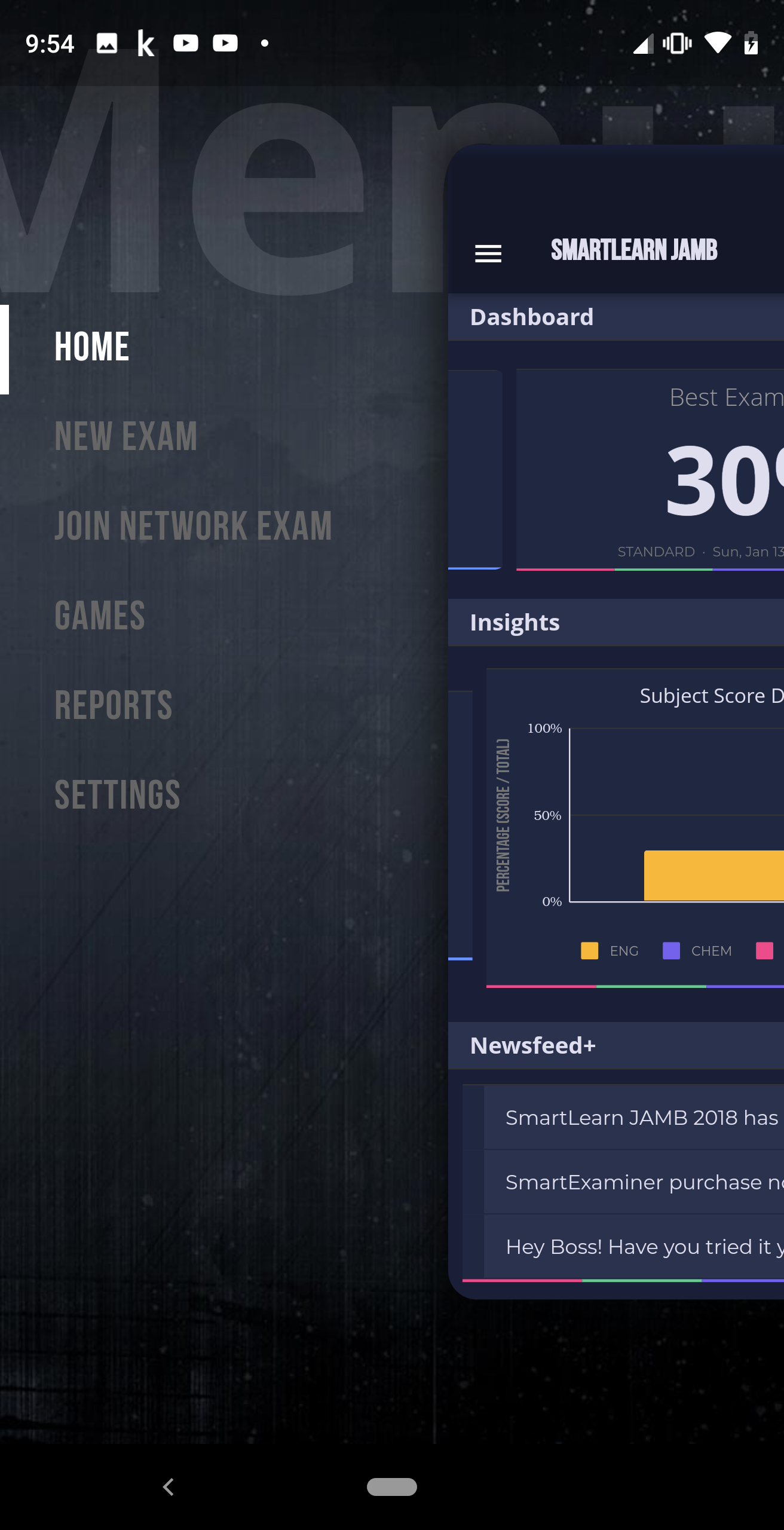
The whole app from one menu Home, a new exam, joining a network exam, the games, the reports and the settings — over a dashboard carrying the best score so far, the subject breakdown and the newsfeed.
When something goes wrong
Questions we get asked.
And the answers we give, in the words we would use on the phone. If yours is not here, it reaches a person.
01 Is SmartLearn a yearly product?
Yes. Each edition carries that year's syllabus and the newest past questions — the current one is SmartLearn JAMB 2026. Downloads for older editions stay available.
02 I have the 2025 edition. Do I buy again?
No, there is an upgrade code at ₦1,000. It only works on a machine where the 2025 edition is already activated, so install 2026 first, check that it finds your existing activation, and then buy the upgrade — not the other way round.
03 Does it work without internet?
After installation and a one-time activation, yes — practice, mocks, explanations, the syllabus and Kace are all local.
04 Can a school or a centre use it for a whole class?
Yes, and the network exam is the way to do it: one laptop serves a paper to every candidate in the room over an ad-hoc WiFi network, and they join on their own phones. The mobile side is free; the desktop network exam licence comes in sizes from ten devices to unlimited.
05 Do two children need two licences?
Not on the same machine. Profile management keeps each person's scores and progress separate within one installation.
Say which product, which machine and what it said. Most questions are one of the ones here; the rest we would rather hear about before the day than on it.


Judge the software, not the slide
Download SmartLearn JAMB.
Then try it on your own machines.
Installers are free to download and a licence unlocks them. Tell us what you are running and how many people it has to serve, and we will say which licence fits — from the software, not from a brochure.
Or compare the whole family first.